
axton-obsidian-visual-skills
💡 Summary
English summary.
🎯 Target Audience
🤖 AI Roast: “Powerful, but the setup might scare off the impatient.”
Risk: Low. Review: shell/CLI command execution; outbound network access (SSRF, data egress); filesystem read/write scope and path traversal. Run with least privilege and audit before enabling in production.
Obsidian Visual Skills Pack


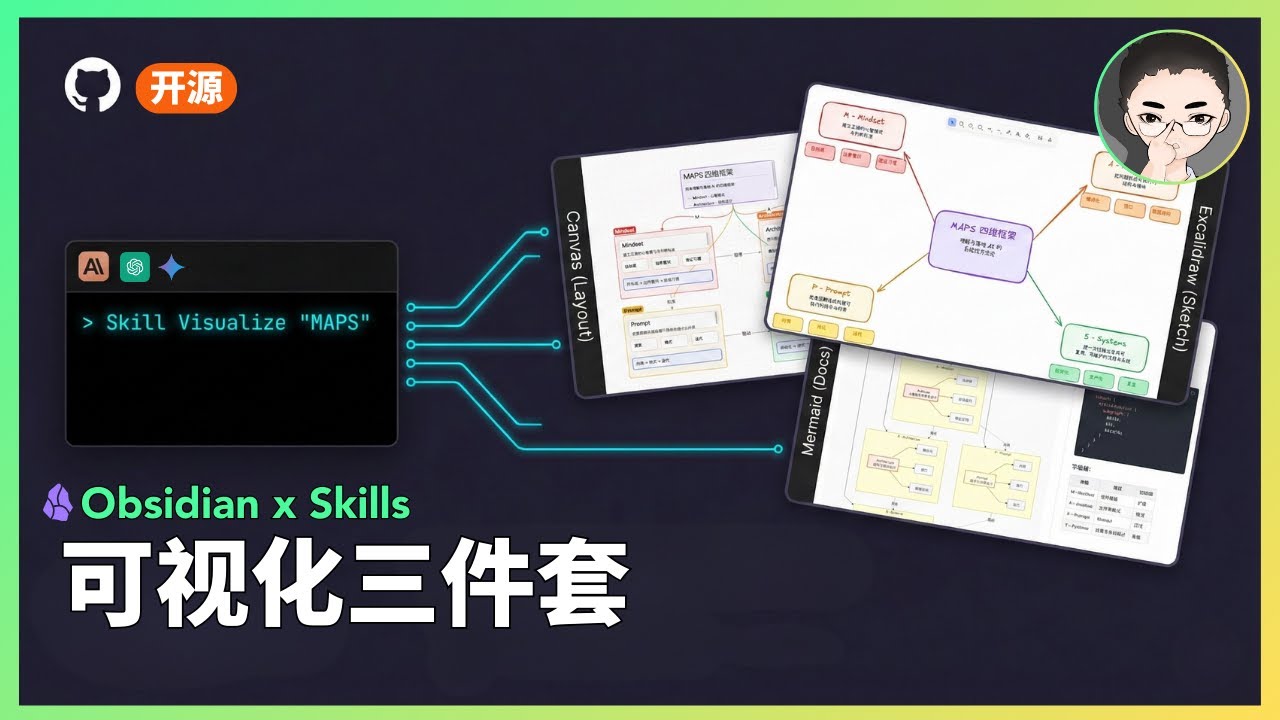
Visual Skills Pack for Obsidian: generate Canvas, Excalidraw, and Mermaid diagrams from text with Claude Code.
Demo
Video Demo
Status
Status: Experimental
- This is a public prototype that works for my demos, but does not yet cover all input scales and edge cases.
- Output quality varies based on model version and input structure; results may fluctuate.
- My primary focus is demonstrating how tools and systems work together, not maintaining this codebase.
- If you encounter issues, please submit a reproducible case (input + output file + steps to reproduce).
What Are Skills?
Skills are prompt-based extensions for Claude Code that give Claude specialized capabilities. Unlike MCP servers that require complex setup, skills are simple markdown files that Claude loads on demand.
Included Skills
1. Excalidraw Diagram Generator
Generate hand-drawn style diagrams directly in Obsidian using the Excalidraw plugin. Creates .md files with embedded Excalidraw JSON that opens natively in Obsidian.
Supported Diagram Types:
| Type | Best For | |------|----------| | Flowchart | Step-by-step processes, workflows, task sequences | | Mind Map | Concept expansion, topic categorization, brainstorming | | Hierarchy | Org charts, content levels, system decomposition | | Relationship | Dependencies, influences, interactions between elements | | Comparison | Side-by-side analysis of approaches or options | | Timeline | Event progression, project milestones, evolution | | Matrix | 2D categorization, priority grids, positioning | | Freeform | Scattered ideas, initial exploration, free-form notes |
Key Features:
- Auto-saves
.mdfiles ready for Obsidian Excalidraw plugin - Hand-drawn aesthetic with Excalifont (fontFamily: 5)
- Full Chinese text support with proper character handling
- Consistent color palette and styling guidelines
Trigger words: Excalidraw, diagram, flowchart, mind map, 画图, 流程图, 思维导图, 可视化
2. Mermaid Visualizer
Transform text content into professional Mermaid diagrams optimized for presentations and documentation. Includes built-in syntax error prevention for common pitfalls.
Supported Diagram Types:
- Process Flow (graph TB/LR) - Workflows, decision trees, AI agent architectures
- Circular Flow - Cyclic processes, feedback loops, continuous improvement
- Comparison Diagram - Before/after, A vs B analysis, traditional vs modern
- Mindmap - Hierarchical concepts, knowledge organization
- Sequence Diagram - Component interactions, API calls, message flows
- State Diagram - System states, status transitions, lifecycle stages
Key Features:
- Built-in syntax error prevention (list conflicts, subgraph naming, special characters)
- Configurable layouts: vertical/horizontal, simple/standard/detailed
- Professional color schemes with semantic meaning
- Compatible with Obsidian, GitHub, and other Mermaid renderers
Trigger words: Mermaid, visualize, flowchart, sequence diagram, 可视化
3. Obsidian Canvas Creator
Create interactive Obsidian Canvas (.canvas) files with MindMap or freeform layouts. Outputs valid JSON Canvas format that opens directly in Obsidian.
Layout Modes:
| Mode | Structure | Best For | |------|-----------|----------| | MindMap | Radial hierarchy from center | Brainstorming, topic exploration, hierarchical content | | Freeform | Custom positioning, flexible connections | Complex networks, non-hierarchical content, custom arrangements |
Key Features:
- Smart node sizing based on content length
- Automatic edge creation with labeled relationships
- Color-coded nodes (6 preset colors + custom hex)
- Proper spacing algorithms to prevent overlap
- Group nodes for visual organization
Trigger words: Canvas, mind map, visual diagram, 思维导图
Installation
Prerequisites
- Claude Code CLI installed
- Obsidian with relevant plugins:
- Excalidraw plugin (for Excalidraw skill)
Option A: Plugin Marketplace (Recommended)
Install via Claude Code's plugin system:
/plugin marketplace add axtonliu/axton-obsidian-visual-skills
/plugin install obsidian-visual-skills
Then restart Claude Code to load the skills.
Option B: Manual Installation
Copy the skill folders to your Claude Code skills directory:
# Clone the repository
git clone https://github.com/axtonliu/axton-obsidian-visual-skills.git

# Copy skills to Claude Code directory
cp -r axton-obsidian-visual-skills/excalidraw-diagram ~/.claude/skills/
cp -r axton-obsidian-visual-skills/mermaid-visualizer ~/.claude/skills/
cp -r axton-obsidian-visual-skills/obsidian-canvas-creator ~/.claude/skills/
Or copy individual skills as needed.
Usage
Once installed, Claude Code will automatically use these skills when you ask for visualizations:
# Excalidraw
"Create an Excalidraw flowchart showing the CI/CD pipeline"
"Draw a mind map about machine learning concepts"
"用 Excalidraw 画一个商业模式关系图"

# Mermaid
"Visualize this process as a Mermaid diagram"
"Create a sequence diagram for the API authentication flow"
"把这个工作流程转成 Mermaid 图表"

# Canvas
"Turn this article into an Obsidian Canvas"
"Create a mind map canvas for project planning"
"把这篇文章整理成 Canvas 思维导图"
File Structure
axton-obsidian-visual-skills/
├── excalidraw-diagram/
│   ├── SKILL.md              # Main skill definition
│   ├── assets/               # Example outputs
│   └── references/           # Excalidraw JSON schema
├── mermaid-visualizer/
│   ├── SKILL.md
│   └── references/           # Syntax rules & error prevention
├── obsidian-canvas-creator/
│   ├── SKILL.md
│   ├── assets/               # Template canvas files
│   └── references/           # Canvas spec & layout algorithms
├── README.md
├── README_CN.md
└── LICENSE
Troubleshooting
Excalidraw: Chinese text not showing as handwriting font
The skill correctly sets fontFamily: 5 (Excalifont). However, Excalifont only covers Latin characters — CJK handwriting font (Xiaolai) is loaded dynamically from the network.
Why it works for me: My Chinese text displays in handwriting style because the font loads successfully from Excalidraw.com.
Why it might not work for you:
- Offline mode or unstable network connection
- Cannot access Excalidraw.com (firewall, etc.)
Solutions:
Option A (Online): Ensure your network can access Excalidraw.com
Option B (Offline):
- Download CJK font files from Excalidraw GitHub
- Place them in your vault's
Excalidraw/CJK Fontsfolder - In Excalidraw plugin settings, enable "Load Chinese fonts from file at startup"
- Restart Obsidian (required for settings to take effect)
Contributing
Contributions welcome (low-maintenance project):
- Reproducible bug reports (input + output + steps + environment)
- Documentation improvements
- Small PRs (fixes/docs)
Note: Feature requests may not be acted on due to limited maintenance capacity.
Acknowledgments
This project builds upon these excellent open-source tools and specifications:
- Excalidraw - Hand-drawn style whiteboard
- Mermaid - Diagram and chart generation
- JSON Canvas - Open file format for infinite canvas (MIT License)
- Obsidian - Knowledge base application
License
MIT License - see LICENSE for details.
Author
Axton Liu - AI Educator & Creator
- Website: axtonliu.ai
- YouTube: @AxtonLiu
- Twitter/X: @axtonliu
Learn More
- Claude Skills 万字长文:从指令到资产的系统化构建指南 - Complete methodology
- AI Elite Weekly Newsletter - Weekly AI insights
- Free AI Course - Get started with AI
© AXTONLIU™ & AI 精英学院™ 版权所有
Pros
- p1
- p2
Cons
- c1
- c2
Related Skills
claude-domain-skills
B“Powerful, but the setup might scare off the impatient.”
my-skills
B“Powerful, but the setup might scare off the impatient.”
terraform-ibm-modules-skills
B“Powerful, but the setup might scare off the impatient.”
Disclaimer: This content is sourced from GitHub open source projects for display and rating purposes only.
Copyright belongs to the original author axtonliu.