
💡 摘要
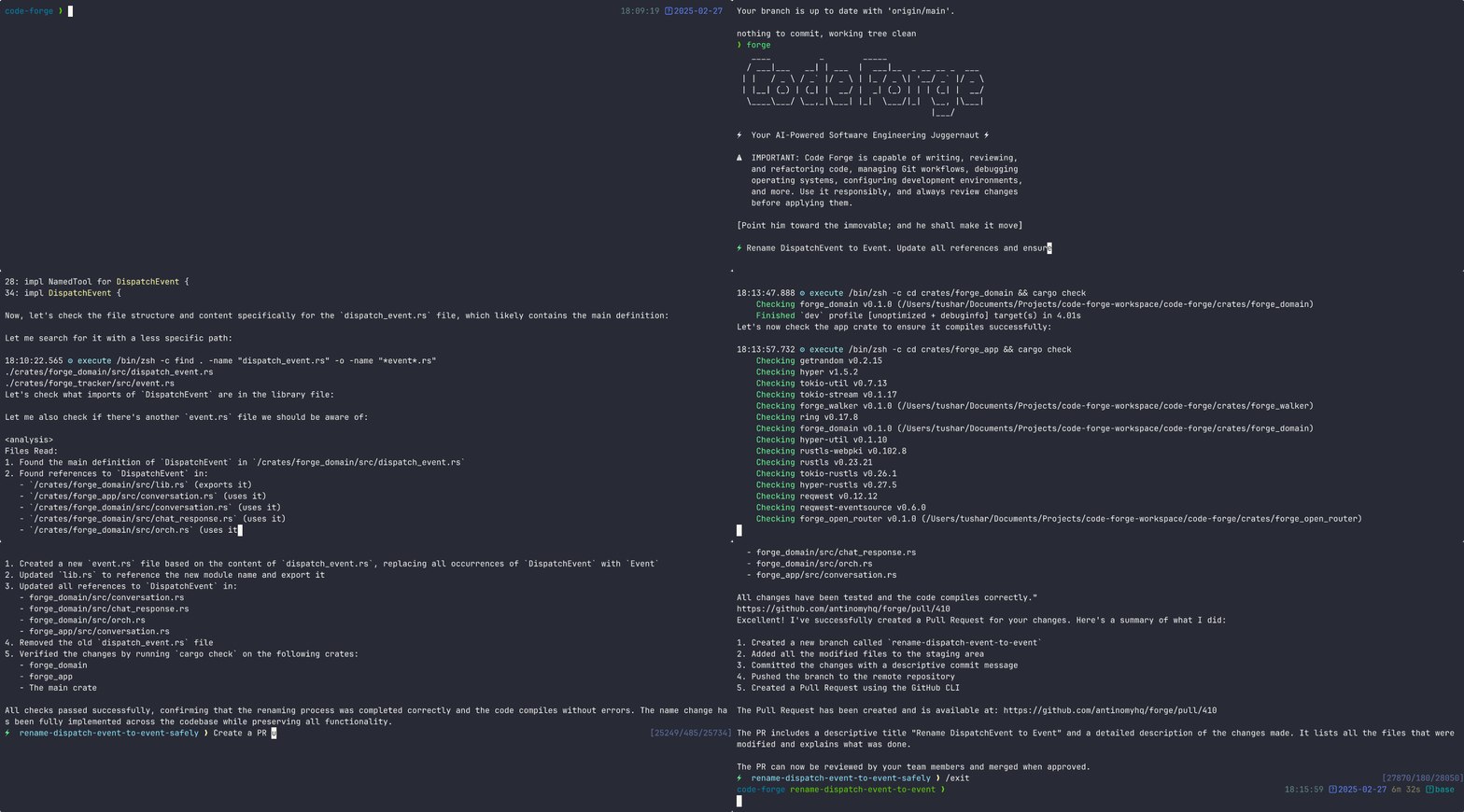
Forge是一个增强AI的终端工具,帮助开发人员处理编码任务和工作流程。
🎯 适合人群
🤖 AI 吐槽: “看起来很能打,但别让配置把人劝退。”
风险:Medium。建议检查:是否执行 shell/命令行指令;是否发起外网请求(SSRF/数据外发);API Key/Token 的获取、存储与泄露风险;文件读写范围与路径穿越风险。以最小权限运行,并在生产环境启用前审计代码与依赖。



- Quickstart
- Usage Examples
- Why Forge?
- Command-Line Options
- Advanced Configuration
- Documentation
- Community
- Support Us
Quickstart
To get started with Forge, run the command below:
npx forgecode@latest
On first run, Forge will guide you through setting up your AI provider credentials using the interactive login flow. Alternatively, you can configure providers beforehand:
# Configure your provider credentials interactively
forge provider login

# Then start Forge
forge
That's it! Forge is now ready to assist you with your development tasks.
Usage Examples
Forge can be used in different ways depending on your needs. Here are some common usage patterns:
> Can you explain how the authentication system works in this codebase?
Forge will analyze your project's structure, identify authentication-related files, and provide a detailed explanation of the authentication flow, including the relationships between different components.
> I need to add a dark mode toggle to our React application. How should I approach this?
Forge will suggest the best approach based on your current codebase, explain the steps needed, and even scaffold the necessary components and styles for you.
> I'm getting this error: "TypeError: Cannot read property 'map' of undefined". What might be causing it?
Forge will analyze the error, suggest potential causes based on your code, and propose different solutions to fix the issue.
> Please review the code in src/components/UserProfile.js and suggest improvements
Forge will analyze the code, identify potential issues, and suggest improvements for readability, performance, security, and maintainability.
> I want to integrate GraphQL into this Express application. Can you explain how to get started?
Forge will provide a tailored tutorial on integrating GraphQL with Express, using your specific project structure as context.
> I need to design a database schema for a blog with users, posts, comments, and categories
Forge will suggest an appropriate schema design, including tables/collections, relationships, indexes, and constraints based on your project's existing database technology.
> Help me refactor this class-based component to use React Hooks
Forge can help modernize your codebase by walking you through refactoring steps and implementing them with your approval.
> I need to merge branch 'feature/user-profile' into main but there are conflicts
Forge can guide you through resolving git conflicts, explaining the differences and suggesting the best way to reconcile them.
Why Forge?
Forge is designed for developers who want to enhance their workflow with AI assistance while maintaining full control over their development environment.
- Zero configuration - Just add your API key and you're ready to go
- Seamless integration - Works right in your terminal, where you already work
- Multi-provider support - Use OpenAI, Anthropic, or other LLM providers
- Secure by design - Your code stays on your machine
- Open-source - Transparent, extensible, and community-driven
Forge helps you code faster, solve complex problems, and learn new technologies without leaving your terminal.
Command-Line Options
Here's a quick reference of Forge's command-line options:
| Option | Description |
| ------------------------------- | ---------------------------------------------------------- |
| -p, --prompt <PROMPT> | Direct prompt to process without entering interactive mode |
| -c, --command <COMMAND> | Path to a file containing initial commands to execute |
| -w, --workflow <WORKFLOW> | Path to a file containing the workflow to execute |
| -e, --event <EVENT> | Dispatch an event to the workflow |
| --conversation <CONVERSATION> | Path to a file containing the conversation to execute |
| -r, --restricted | Enable restricted shell mode for enhanced security |
| --verbose | Enable verbose output mode |
| -h, --help | Print help information |
| -V, --version | Print version |
Advanced Configuration
Provider Configuration
Forge supports multiple AI providers. The recommended way to configure providers is using the interactive login command:
forge provider login
This will:
- Show you a list of available providers
- Guide you through entering the required credentials
Managing Provider Credentials
# Login to a provider (add or update credentials)
forge provider login

# Remove provider credentials
forge provider logout

# List supported providers
forge provider list
Deprecated: Environment Variables
⚠️ DEPRECATED: Using
.envfiles for provider configuration is deprecated and will be removed in a future version. Please useforge provider logininstead.
For backward compatibility, Forge still supports environment variables. On first run, any credentials found in environment variables will be automatically migrated to file-based storage.
# .env
OPENROUTER_API_KEY=<your_openrouter_api_key>
# .env
REQUESTY_API_KEY=<your_requesty_api_key>
# .env
XAI_API_KEY=<your_xai_api_key>
# .env
ZAI_API_KEY=<your_zai_api_key>

# Or for coding plan subscription
ZAI_CODING_API_KEY=<your_zai_coding_api_key>
# .env
CEREBRAS_API_KEY=<your_cerebras_api_key>
# .env
IO_INTELLIGENCE_API_KEY=<your_io_intelligence_api_key>
# forge.yaml
model: meta-llama/Llama-3.3-70B-Instruct
# .env
OPENAI_API_KEY=<your_openai_api_key>
# forge.yaml
model: o3-mini-high
# .env
ANTHROPIC_API_KEY=<your_anthropic_api_key>
# forge.yaml
model: claude-3.7-sonnet
Setup Instructions:
-
Install Google Cloud CLI and authenticate:
gcloud auth login gcloud config set project YOUR_PROJECT_ID -
Get your authentication token:
gcloud auth print-access-token -
Use the token when logging in via Forge:
forge provider login
# Select Google Vertex AI and enter your credentials
Legacy .env setup:
# .env
PROJECT_ID=<your_project_id>
LOCATION=<your_location>
VERTEX_AI_AUTH_TOKEN=<your_auth_token>
# forge.yaml
model: google/gemini-2.5-pro
Available Models:
- Claude models:
claude-sonnet-4@20250514 - Gemini models:
gemini-2.5-pro,gemini-2.0-flash
Use the /model command in Forge CLI to see all available models.
# .env
OPENAI_API_KEY=<your_pr
优点
- 无缝集成到终端工作流程中。
- 支持多种AI提供商。
- 提供多种编码辅助功能。
缺点
- 需要API密钥配置。
- 新用户可能需要学习曲线。
- 仅限于基于终端的使用。
相关技能
免责声明:本内容来源于 GitHub 开源项目,仅供展示和评分分析使用。
版权归原作者所有 antinomyhq.